
文章图片
第二步
然后 , 我们把Xamarin中创建的MyButton与MyButtonRender直接复制到MAUI的项目中 , 如下所示:
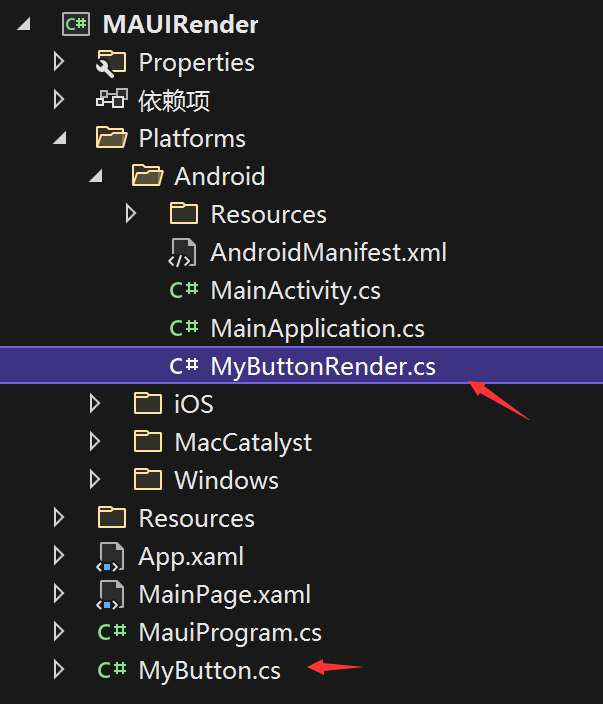
文章图片
MyButtonRender类修改如下:
protectedoverride void OnElementChanged(ElementChangedEventArgs<Button> e){base.OnElementChanged(e);if(Control!= null)Control.SetBackgroundColor(global: :Android.Graphics.Color.Red);}}}
说明:此处更新涉及更新命名空间引用
- 移除旧的Xamarin引用: using Xamarin.Forms.Platform.Android; using Xamarin.Forms;
- 添加新的MAUI引用: using Microsoft.Maui.Controls; using Microsoft.Maui.Controls.Platform; using Microsoft.Maui.Controls.Compatibility.Platform.Android.AppCompat;
MyButton类修改如下:
}}
说明:using Xamarin.Forms;更新为:using Microsoft.Maui.Controls;
第三步
依赖注入自定义的Render
上面所讲到移除 [assembly: ExportRenderer(typeof(MyButton) ,typeof(MyButtonRender))] 声明 , 在Xamarin当中 , 渲染器强制声明在Android项目中 , 耦合性很强 。 这一点在MAUI项目当中 , 则是通过Startup类中依赖注入的形式添加 , 通过扩展方法 ConfigureMauiHandlers 添加 AddCompatibilityRenderer , 如下所示:
说明:之所以使用ANDROID 条件 , 取决于我们并为定义IOS平台的自定义渲染器 , 当然我们可以这么做 , 如果当该渲染器仅仅为Android提供 , 我们即可单独设置 。
第四步
XAML页面中添加MyButton命名空间 , 声明MyBuToon , 如下所示:
总结
这篇文章主要给大家介绍了如何将Xamarin Render移植到 .NET MAUI项目当中 , 当然在新的MAUI当中 , 仍然建议大家使用新的Handler处理程序来实现 , 并且它提供了更好的性能以及灵活性 。
微软最有 价值专家(MVP)
微软最有价值专家是微软公司授予第三方技术专业人士的一个全球奖项 。 28年来 , 世界各地的技术社区领导者 , 因其在线上和线下的技术社区中分享专业知识和经验而获得此奖项 。
特别声明:本站内容均来自网友提供或互联网,仅供参考,请勿用于商业和其他非法用途。如果侵犯了您的权益请与我们联系,我们将在24小时内删除。